5. Add the print
The tee is charcoal with one picture on the chest. That means the UVs can be simple: anything facing forward gets a flat projection from the front, everything else points at a single plain pixel.
The print
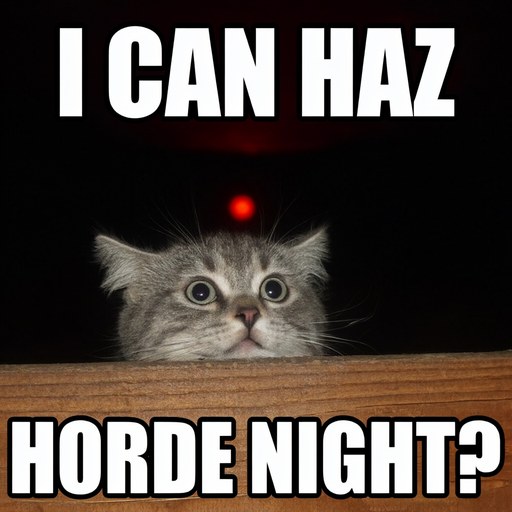
Ours came from Qwen-Image running locally in ComfyUI. The prompt asks for an original cat (not a known meme photo) with an Impact-style caption, top and bottom. tools/gen_print.py sends the workflow, waits, and saves each print with its seed and prompt next to it, so we can make the same one again.
There are four: "NINE LIVES / SEVEN DAYS", "I CAN HAZ / HORDE NIGHT?", "THIS LOOT / IS MINE NOW" and "WHEN THE SCREAMER / STARTS IT". The tee wears the horde one.
Image models still fumble text sometimes. Generate a few and pick one that's spelled right.
UVs by projection
Per triangle: if it faces forward (+z), its vertices take a front projection. If not, they get UV (0.995, 0.015), a corner of the texture that's just tee colour.
UV_X0, UV_Y0, UV_K = -0.36, 0.88, 1 / 0.75     # 75 cm square of the body, from x -0.36 and y 0.88
if front[t]:
    uv = ((-v[vi, 0] - UV_X0) * UV_K, 0.05 + (v[vi, 1] - UV_Y0) * UV_K)
else:
    uv = (0.995, 0.015)
A vertex shared by a front and a back triangle gets split into two, one for each UV.
:::danger The mirror trap
Look at that -v[vi, 0]. The first build of this tee read "ZAH NAC I" in game.
Unity is left-handed. The player faces +z, so when you look at them from the front, their +x is on your left. If u runs along +x, the print comes out mirrored. Use -x. :::
The texture
2048 square, filled with charcoal, with the print pasted where the projection puts it: 20 cm wide, its top edge at y 1.43.
img = Image.new("RGB", (2048, 2048), (38, 38, 44))
w = int(round(PRINT_W * UV_K * size))
pr = Image.open(print_png).convert("RGB").resize((w, w), Image.LANCZOS)
cx = int(round((0 - UV_X0) * UV_K * size))
top_v = 0.05 + (PRINT_TOP - UV_Y0) * UV_K
img.paste(pr, (cx - w // 2, int(round((1 - top_v) * size))))   # v goes up, image rows go down
Because the UVs are in metres on the body, the same texture fits both the fitted female tee and the loose male one. The print lands in the same place on both.
Jeans need more
Jeans have pockets, seams and stitching all the way round, so a front-only projection won't do. make_jeans.py uses a box projection into four quarters of the texture: front, back, and each side, with v from the height. Then it paints the pockets, yoke, fly, rivets, belt loops, side seams and stitching in metres in each quarter, and turns a height map of the same details into a tangent-space normal map. Same idea as the tee, just more of it, and again one texture fits both sexes.