3. Make the mesh by script
No sculpting. The shirt is a shell around the body, made from a distance field, then cut open at the hem, the sleeves and the neck. It sounds fancy. It's about 150 lines of numpy.
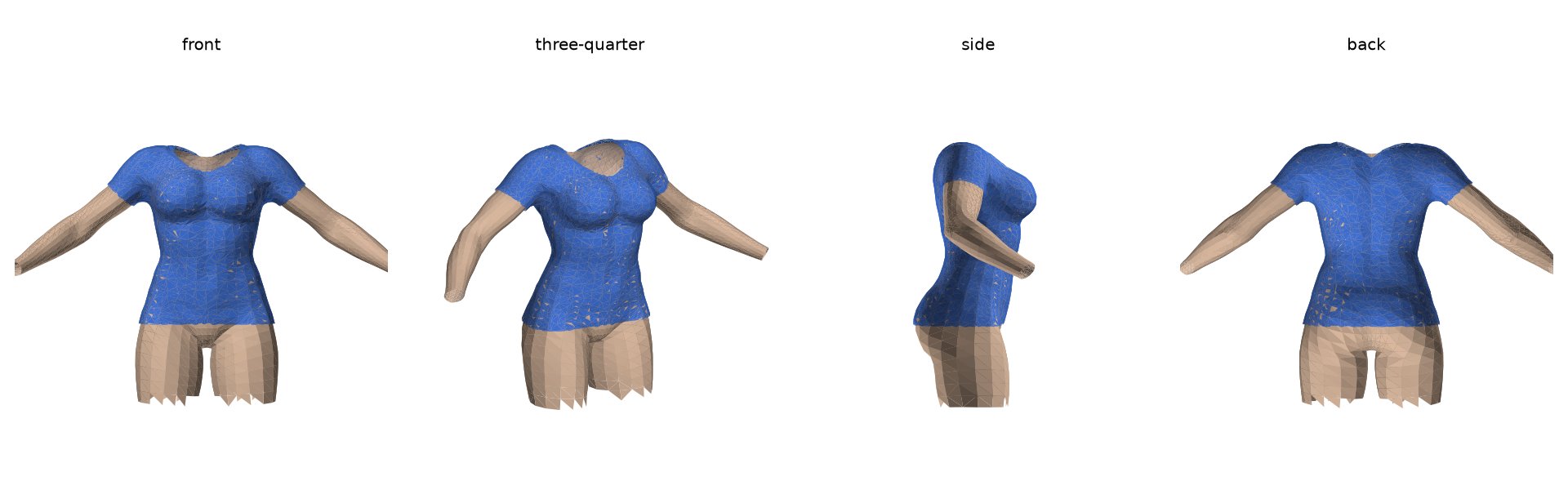
Everything below is from tools/make_tee.py. All sizes are in metres, in the body's bind pose.
H = 0.005          # grid step: 5 mm
GAP = 0.006        # cloth sits 6 mm off the skin
R = 0.025          # closing radius: dips narrower than this get bridged
TRIS = 9000        # triangle budget before the cuts
HEM_Y = 0.985      # hem height (hips at 0.974)
SLEEVE = 0.45      # sleeve length, as a fraction of shoulder to elbow
The distance field
Put a 5 mm grid around the torso. For every grid point, find the nearest point on the body and how far away it is, with a sign: negative inside the body, positive outside.
To get the sign right, sample the body surface densely (every 1.5 mm, with interpolated normals), find the nearest sample, and check which side of its normal you're on:
tree = cKDTree(samples)
d, i = tree.query(P, workers=-1)
sign = np.sign(np.einsum("ij,ij->i", P - samples[i], normals[i]))
D = (d * np.where(sign == 0, 1, sign)).reshape(shape)
Now D = 0.006 is a surface 6 mm off the skin. You could stop there and get a skin-tight bodysuit that dips into every crease. Cloth doesn't do that.
The closing: cloth bridges dips
Cloth stretches across gaps: under the bust, the spine groove, between the shoulder blades. A closing does the same thing to the shape. Grow the body by R, then shrink it back by R. Anything narrower than R gets filled in.
# The body grown by GAP + R, as a surface.
grown, _, _, _ = measure.marching_cubes(D, GAP + R, spacing=(H, H, H))
grown += lo
# Shrink it back: inside the grown shape, the field is R minus the distance to that surface.
inside = D.ravel() < GAP + R
F = (D.ravel() - GAP).copy()
dd, _ = cKDTree(grown).query(P[inside], workers=-1)
F[inside] = R - dd
F = F.reshape(shape)
F < 0 is now "inside the shirt". With R at 2.5 cm, the shirt spans the dips a T-shirt would.
Marching cubes, smooth, simplify
v, f, _, _ = measure.marching_cubes(F, 0.0, spacing=(H, H, H))
v += lo
v, f = largest_component(v, f)     # drop any stray bits
v = taubin(v, f, it=8)             # smooth without shrinking
v, f = fast_simplification.simplify(v.astype(np.float32), f.astype(np.int32), target_count=TRIS)
Taubin smoothing is plain Laplacian smoothing done twice per pass, once forward and once slightly backward, so the mesh gets smoother without shrinking. Marching cubes on a 5 mm grid makes a lot of triangles; simplifying to 9000 keeps the game happy.
Cut it open
Right now it's a closed shell, a torso-shaped balloon. Each opening is a scalar field over the vertices, and the cut keeps the part where the field is negative. Triangles that straddle zero get split exactly along it, so the edges come out clean instead of jagged.
v, f = clip(v, f, HEM_Y - v[:, 1]) # the hem: keep everything above HEM_Y
Sleeves are a cylinder along each upper arm: cut past 45% of the way to the elbow, but only near the arm's axis (so the cut doesn't reach into the torso).
a, b = J["LeftArm"], J["LeftForeArm"]        # shoulder and elbow joints
L = np.linalg.norm(b - a)
d_ = (b - a) / L
s = (v - a) @ d_                             # how far along the arm
rad = np.linalg.norm((v - a) - np.outer(s, d_), axis=1)   # how far from its axis
v, f = clip(v, f, -np.maximum(SLEEVE * L - s, rad - SLEEVE_R))
The neck is an ellipsoid that's round below and straight up above, deeper at the front than at the back. Then one last cut takes off anything above the shoulders. Keep the largest piece, smooth just the cut edges a little, and push any vertex that smoothing pulled toward the skin back out.
Weights: borrow them from the skin
The shirt has to bend exactly like the body under it. So for each shirt vertex, take the 8 nearest body vertices, blend their bone weights by inverse squared distance, then smooth the weights across the shirt a few times so they don't jump:
dist, nn = cKDTree(body_verts).query(v, k=8, workers=-1)
inv = 1 / np.maximum(dist, 1e-4) ** 2
W = np.zeros((len(v), n_bones))
for k in range(8):
    for j in range(4):
        np.add.at(W, (np.arange(len(v)), bone_index[nn[:, k], j]), inv[:, k] * bone_weight[nn[:, k], j])
W /= W.sum(1, keepdims=True)
for _ in range(6):
    W = 0.5 * W + 0.5 * (neighbours @ W)
# Unity takes four bones per vertex: keep the four biggest and renormalise.
top = np.argsort(-W, 1)[:, :4]
Mark what to hide in first person
In first person the camera sits inside the head, and the collar of your shirt fills the screen. The game has a fix for this, driven by vertex colours (step 6 explains how). Here we just mark the vertices: anything above y 1.38 and near the middle gets a 1.
hide = (v[:, 1] > 1.38) & (np.abs(v[:, 0]) < 0.27)
What it writes
A plain text file for the Unity builder, build/tee_<sex>.txt:
bones Origin Hips Spine ...              every bone name, in bind-csv order
v x y z  nx ny nz  u v  hide  b0 w0 b1 w1 b2 w2 b3 w3
f a b c
Plus an OBJ to look at and a preview PNG. Check the preview every time. It's much faster than a trip through Unity and the game.
py -3.12 tools/make_tee.py <ref> art/prints/horde.png female
That's the fitted tee. The male body needs something looser, which is the next step.