7. Write the XML
The bundle exists. Now the game needs to know there's an item that wears it.
ModInfo.xml
<?xml version="1.0" encoding="UTF-8"?>
<xml>
	<Name value="KitsuneTee"/>
	<DisplayName value="Kitsune Tee"/>
	<Version value="0.0.8"/>
	<Description value="A cat meme T-shirt and jeans for the player."/>
	<Author value="AdaInTheLab"/>
</xml>
items.xml
Here's the tee, before it gets armor stats (that's the next step):
<configs>
	<append xpath="/items">
		<item name="kitsuneTee">
			<property name="Extends" value="armorPrimitiveMaster"/>
			<property name="CreativeMode" value="Player"/>
			<property name="CustomIcon" value="armorAthleticOutfit"/>
			<property name="DescriptionKey" value="kitsuneTeeDesc"/>
			<property name="DisplayType" value="armorPrimitiveOutfit"/>
			<property name="ArmorGroup" value="groupPrimitive"/>
			<property name="Tags" value="upperbody,chest,armor,armorChest,lightArmor,lightArmorDeg"/>
			<property name="EquipSlot" value="Chest"/>
			<property name="SoundPickup" value="outfit_cloth_grab"/>
			<property name="SoundPlace" value="outfit_cloth_place"/>
			<property class="SDCS">
				<property name="Prefab" value="#@modfolder(KitsuneTee):Resources/KitsuneTee.unity3d?gear{sex}KitsuneTee"/>
				<property name="TransformName" value="body"/>
				<property name="Excludes" value=""/>
			</property>
		</item>
	</append>
</configs>
The parts that matter:
Extends armorPrimitiveMastergets you the basics of a cloth chest piece. Extends copies properties, which will matter in the next step.EquipSlot Chestputs it in the chest slot.CustomIconborrows a vanilla icon (the athletic outfit) so we don't need to make one.- The
Prefabpath:#@modfolder(...)points into your mod folder, then the bundle file, then?and the prefab name.{sex}becomesMaleorFemale, which is why the prefabs are calledgearFemaleKitsuneTeeandgearMaleKitsuneTee. Excludesis empty because the tee has no skin of its own. The player's body stays on under it, so arms and neck still show. If your outfit covers the whole body and you want the base body gone (to stop skin poking through), list the parts here. Then your gear has to supply any skin that's still visible.
The jeans item is the same with its own name, description and gear{sex}KitsuneTeeJeans prefab. It extends kitsuneTee.
Localization.csv
Key,File,Type,UsedInMainMenu,NoTranslate,english
kitsuneTee,items,Item,,,Kitsune Tee
kitsuneTeeDesc,items,Item,,,"A cat meme T-shirt. Nine lives, seven days."
kitsuneTeeJeans,items,Item,,,Kitsune Tee and Jeans
kitsuneTeeJeansDesc,items,Item,,,"The cat meme tee with jeans. Ready for the horde, or at least for the photo."
First look in game
Copy the KitsuneTee folder into your Mods folder and start the game. Open the log (%APPDATA%\7DaysToDie\logs or the client's -logfile) and look for:
Loaded Mod: KitsuneTee (0.0.8)
No line, no test. If it's missing, the game didn't load your mod and nothing you see means anything.
In a world, open the console (F1) and give yourself one:
giveself kitsuneTee 1 1 true
Equip it from the backpack. The doll on the character screen should wear it. Check from the front and the back, then step into third person and look at it in the world.
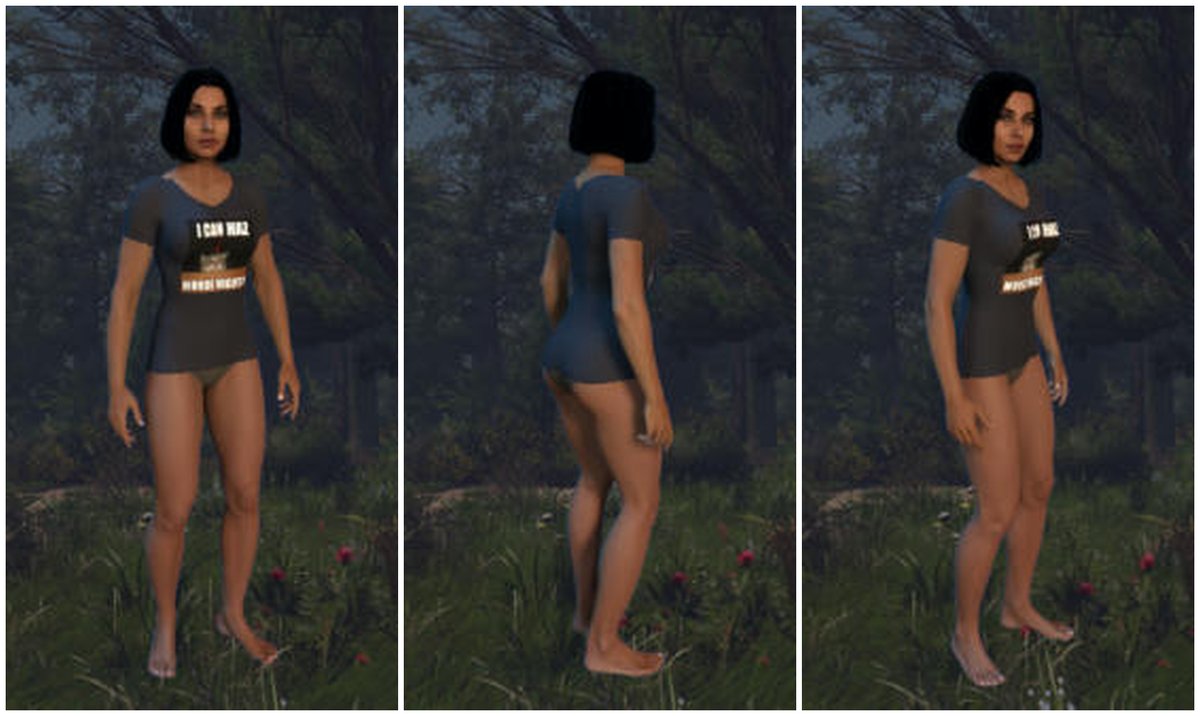
If the doll is wearing nothing, search the log for SDCSUtils. A wrong prefab name or bundle path is logged there.